When?
Tuesday March 10th
What is it?
Fleming College has added integration that enables Microsoft Teams on Cisco devices. This integration enhances the device users experience when they join Microsoft Teams meeting hosted at Fleming.
Webex meeting experience – multi screen with flexible layout options
participant list showing both Microsoft and video integration participants
Bi-directional content sharing between the device and Microsoft Teams
Meeting status indicators on the device, including recording, transcription and participant waiting in the lobby
This integration also provides the one button to push (OBTP)
Why?
Fleming supports 2 video conferencing applications, Microsoft Teams, and Cisco Webex, and meeting rooms contain Cisco Webex devices, this licensing allows users to seamlessly choose which application they want to use to host their meeting that leverages the hardware in the space.
How?
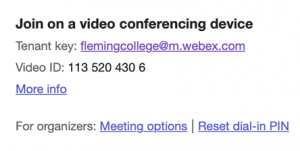
As of March 10th, when a Teams meeting is created, there will be a new portion of the meeting invite at the bottom.
When you click on “More Info”
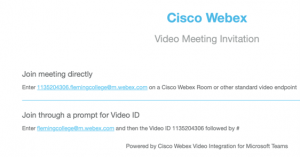
To get the OBTP feature in a meeting room, when sending the Teams invite, add the room as a participant.