Author Archives: skicak

Fall 2026 Student Software Image – Software Requests

When?

Due before Friday, June 5th, 2026

What?

We are asking Fleming College faculty and academic technologists to review our Student Desktop PC software listing with the lens of modernizing and updating the current student desktop software offering. Where possible, we should be replacing aged software with more current software that evolves with current computing environments, industry use and related curriculum.

Why?

Fleming ITS is beginning the annual task of preparing the software image used to refresh all common-use student PCs every August. As part of this summer’s deployment the Windows operating system is being upgraded to Windows 11. As part of the annual update exercise you can request:

  • New software to be added
  • A version upgrade to an existing application
  • Removal of software no longer required by your program

Please do so by submitting a TDX ticket using the Student Desktop Application Changes page.
The cut-off date for software request submissions will be June 5th, 2026. This gives ITS department time to build, test and deploy the new image to all common-use student workstations at the College, prior to the start of the fall semester.


Planned Updates – Software to be Removed from the 2026 Student Image:

The applications listed below will be removed from the student image in an effort to standardize, simplify, optimize performance and strengthen security posture. Please alert us if you anticipate any negative consequences as a part of these planned changes:

  • Remove the full desktop version of Outlook and transition to the  Outlook Progressive Web App (PWA)  for student use. Please indicate if you’re aware of any courses or curriculum that requires the full desktop version of Outlook or uses the “mail merge” functionality.
  • Remove Zoom in favour of Microsoft Teams and Cisco WebEx as the College’s preferred meeting and collaboration platforms. Students can still attend the occasional external Zoom meeting as required using the Zoom join from a browser feature.
  • Remove Firefox web browser while retaining Google Chrome and Microsoft Edge, to better align with browser market share in 2026.

Support

We are happy to assist you!
Please use our contact information below if you need our help.

For more information, contact
IT Service Desk
https://tdx.flemingcollege.ca/
1-866-353-6464 x4111 Option #1
Check Network System Status
Launch of new Microsoft Teams Integration on Cisco Webex Devices

When?

Tuesday March 10th

What is it?

Fleming College has added integration that enables Microsoft Teams on Cisco devices.  This integration enhances the device users experience when they join Microsoft Teams meeting hosted at Fleming.

Webex meeting experience – multi screen with flexible layout options

participant list showing both Microsoft and video integration participants

Bi-directional content sharing between the device and Microsoft Teams

Meeting status indicators on the device, including recording, transcription and participant waiting in the lobby

This integration also provides the one button to push (OBTP)

Why?

Fleming supports 2 video conferencing applications, Microsoft Teams, and Cisco Webex, and meeting rooms contain Cisco Webex devices, this licensing allows users to seamlessly choose which application they want to use to host their meeting that leverages the hardware in the space.

How?

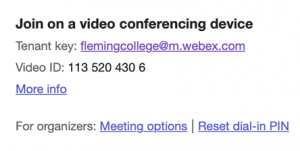
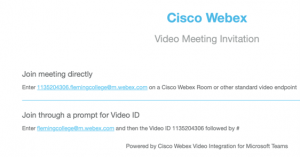
As of March 10th, when a Teams meeting is created, there will be a new portion of the meeting invite at the bottom.

When you click on “More Info”

To get the OBTP feature in a meeting room, when sending the Teams invite, add the room as a participant.

Slido Lunch and Learn Invite

When?

Wednesday, February 25th at 12:00 pm

What is it?

Slido Lunch and Learn

Grab your lunch and join us on February 25th at noon for a short session on making the most of Slido.

Slido is an audience interaction platform for live polls, Q&A and quizzes, integrated into PowerPoint, Webex and MS Teams, making it easy for meeting hosts to collect questions, gain insights and run interactive sessions.

The session will cover how to:

  • Get started using Slido
  • Using Slido with PowerPoint, Webex and Microsoft Teams
  • Cool things you can do with Slido

Why?

Prize Alert  Attend this upcoming session for a chance to win a $100 Best Buy gift card.

Where?

Join us on Webex; register here to receive a meeting invite.

Unplanned Outage: Frost Main Line (705) 324-9144

When?

Thursday, December 18, 2025.

Why?

A localized Bell circuit outage.

What’s the impact?

  • Incoming calls to the Frost main line (705) 324-9144 will be unsuccessful.
    • As a temporary workaround, incoming callers can instead dial (705) 749-5530 to reach the College’s main auto-attendant.
  • If you require emergency assistance:
    • To contact Emergency Services,
      • use a personal mobile phone to dial 911
    • To contact Campus Security,
      • use a mobile phone by dialing

        705-749-5530 ext. 4444

      • If safe to do so, notify Campus Security in person (202F)

For more information, contact

 IT Service Desk

https://tdx.flemingcollege.ca

1-866-353-6464 x4111 Option #1

Check Network System Status