When?
- Thursday, April 16, 2026
- After hours 9pm-11pm
Why?
- To perform system updates
What’s the impact?
- All Bookit portals will be inaccessible
For more information, contact Facilities, Services and Support
For more information, contact Facilities, Services and Support
Monday, April 6, 2026 from 10:00 pm to 10:30 pm.
To update security certificates on the VDI environment.
There will be a brief outage of VDI during this maintenance activity.
From Tuesday, March 31, at 4:00 p.m. to Wednesday, April 1, at 8:00 a.m.
To perform fiscal year-end activities.
During the maintenance window, the Evolve Administrative System will be unavailable.
Thursday, March 26th and Friday March 27th 2026 (2 Days)
To upgrade the Haliburton’s campus wireless (Wi-Fi) network infrastructure.
Fleming’s on-campus wireless (Wi-Fi) service will experience short, intermittent outages during this maintenance window.
When?
Tuesday March 10th
What is it?
Fleming College has added integration that enables Microsoft Teams on Cisco devices. This integration enhances the device users experience when they join Microsoft Teams meeting hosted at Fleming.
Webex meeting experience – multi screen with flexible layout options
participant list showing both Microsoft and video integration participants
Bi-directional content sharing between the device and Microsoft Teams
Meeting status indicators on the device, including recording, transcription and participant waiting in the lobby
This integration also provides the one button to push (OBTP)
Why?
Fleming supports 2 video conferencing applications, Microsoft Teams, and Cisco Webex, and meeting rooms contain Cisco Webex devices, this licensing allows users to seamlessly choose which application they want to use to host their meeting that leverages the hardware in the space.
How?
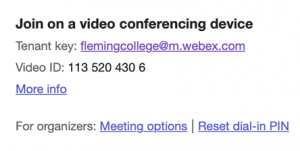
As of March 10th, when a Teams meeting is created, there will be a new portion of the meeting invite at the bottom.
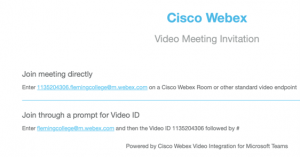
When you click on “More Info”
To get the OBTP feature in a meeting room, when sending the Teams invite, add the room as a participant.
Saturday, March 7, 2026, from 8:00 pm to 11:59 pm.
To perform system upgrades.
During the maintenance window, student files stored the network file server will be unavailable. Students will be impacted as follows:
Saturday, March 7, 2026, from 2:00 pm to 6:00 pm.
To upgrade the College’s wireless (Wi-Fi) network infrastructure.
Fleming’s on-campus wireless (Wi-Fi) service will experience short, intermittent outages during this maintenance window.
After the upgrade, the next time you connect to Fleming’s Wi-Fi service, your device may ask you to confirm the connection information and/or trust a new certificate – which is safe to do as part of this upgrade. More guidance on troubleshooting wireless connectivity can be found here: Article – Help Connecting to Fleming.
Wednesday February 25th, 2026 from 2:30pm to 6:30pm.
To preform maintenance activities on the College’s OneCard systems.
OneCard services to add funds and make purchase transactions will be unavailable during this planned outage.
Monday, February 23, 2026
The Fleming ITS Department now offers Remote Control Support to provide faster and more effective technical assistance without requiring an in-person visit.
Staff using Fleming-issued computers can grant IT Service Desk technicians secure remote access to their devices through the TeamViewer application. This allows IT staff to diagnose and resolve issues more efficiently while minimizing disruption to your work.
Visit the TDX Service Portal to request Remote Control Support.
Cybercriminals posing as legitimate IT support staff may contact you by phone or email and urge you to join a malicious remote access session. If anything seems suspicious, do not accept the remote session invitations or provide any device connection information. Only participate in remote support sessions scheduled through the TDX Service Portal with an authorized member of the Fleming College IT Service Desk team.
Saturday, February 21, 2026, from 9:00 am to noon.
To perform system upgrades.
During the maintenance window, student files stored the network file server will be unavailable. Students will be impacted as follows:
Access to all forms of Office 365 file storage (OneDrive, MS Teams, and SharePoint) will not be impacted.